
Deposit funds into your 666C Game account by using one of the payment options supported by the platform. Before making a deposit, log in to your account and make sure your account details are correct. Select your preferred payment method, enter the amount you want to add, and carefully review all transaction details. Follow the payment instructions shown on the platform and confirm the transaction only after checking the information. Once the payment is completed, allow some time for the balance to update. Always keep your payment receipt or transaction details for future reference, and check the latest deposit rules and requirements before making a payment.
Make a Deposit
Adding money to your 666C Game account is done through the payment methods available on the platform. Start by signing in and going to the deposit section. Choose a suitable payment option, enter the required details, and type in the amount you want to add. Before completing the transaction, check the account and payment information carefully. Follow the instructions shown on the platform and save your transaction receipt or reference number for future use.
Common Payment Methods
- EasyPaisa
- JazzCash
- Bank Transfer
- Other supported local payment options
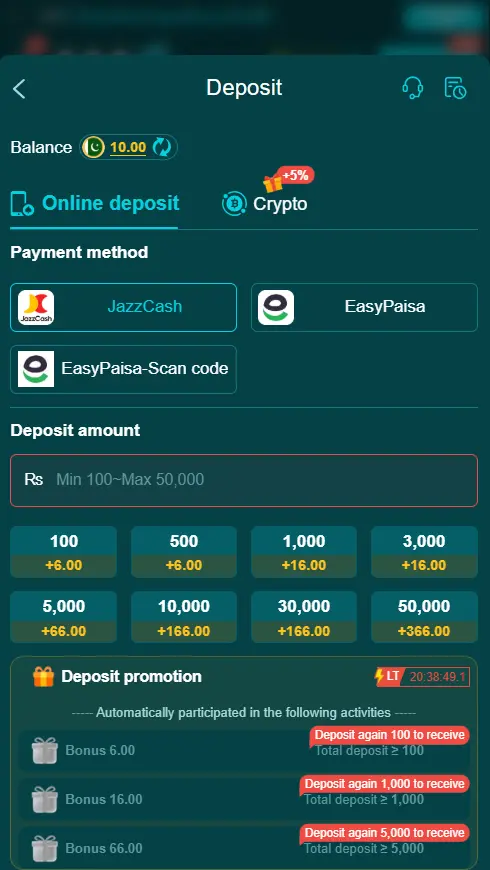
How to Deposit Money
- Log in to your 666C Game account.
- Open the Deposit or Add Funds section.
- Select a payment method available on the platform.
- Enter the amount you want to deposit.
- Follow the payment instructions shown on the screen.
- Double-check the transaction details before confirming.
- Complete the payment and wait for the balance to update.
- Keep your transaction record for future reference.
Information
| Item | Details |
|---|---|
| Account Required | Yes |
| Payment Methods | EasyPaisa, JazzCash, Bank Transfer |
| Currency | PKR |
| Processing Time | Usually a few minutes |
| Internet Connection | Required |
Tips for a Successful Deposit
- Use your own payment account.
- Enter the correct deposit amount.
- Verify the payment details before confirming.
- Keep your payment receipt until the balance is updated.
- Use a stable internet connection during the transaction.
Common Deposit Issues
Payment Not Received
Wait a few minutes after completing the payment and then refresh your 666C Game account to check the updated balance. If the amount does not appear after some time, review your transaction details and make sure the payment was completed successfully. If the issue continues, contact the platform’s customer support team and provide your payment receipt or transaction reference so they can check the payment status.
Incorrect Payment Details
Always check your 666C Game account number, payment details, and transaction information carefully before sending any funds. Make sure all information is correct to help avoid payment errors or delays.
Deposit Delayed
Some 666C Game transactions may take extra time to complete because of payment processing, network issues, or delays from the selected payment service. If your balance does not update immediately, wait for a short while and check the transaction status again.
Payment Failed
Before trying again on 666C Game, check your account balance and make sure your internet connection is stable. Also review the payment details carefully to confirm that all information is correct. This can help you avoid repeated errors or unnecessary transaction delays.
Deposit Now
The Deposit Now option on 666C Game allows users to add funds to their account through the payment methods supported by the platform. To begin, log in and open the deposit section, then select an available payment option and enter the required amount. Carefully review the account and payment details before confirming the transaction. Follow the instructions shown on the platform to complete the payment. After submitting the payment, check your account balance and keep the transaction receipt or reference number for future records.
(Place your deposit button or payment form here.)