
Log in to your 666C Game account using your registered mobile number or username along with your password. The login process is designed to provide easy access while helping keep your account information protected. Before signing in, make sure you are using the correct login details and an official or trusted platform source. For Android users, a stable internet connection can also help provide a smoother login experience.
Before logging in to your 666C Game account, check that your username, mobile number, and password are entered correctly. A stable internet connection can also help prevent login errors. If you forget your password, use the platform’s official password recovery option to reset it and follow the instructions provided. Never share your password or verification details with anyone.
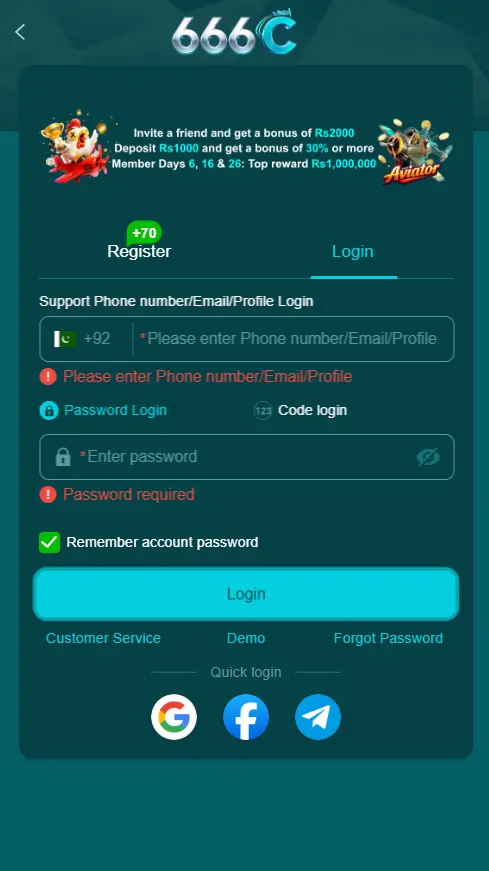
Login to 666C Game
Enter your account details to access your profile.
- Registered Mobile Number or Username
- Password
- Login Button
- Forgot Password?
- Remember Me (Optional)
How to Log In to 666C Game
- Open the 666C Game app or trusted website.
- Select the Login option.
- Enter your registered mobile number or username.
- Type your account password.
- Complete any verification requested by the platform.
- Select Sign In to open your account.
Login Requirements
| Requirement | Details |
|---|---|
| Registered Account | Required |
| Mobile Number or Username | Required |
| Password | Required |
| Internet Connection | Stable |
| Device | Android or Supported Browser |
Forgot Your Password?
If you cannot remember your password, follow these steps:
- Tap Forgot Password.
- Enter your registered mobile number.
- Verify your identity using the OTP code.
- Create a new password.
- Log in with your updated credentials.
Login Tips
- Use your registered login details.
- Check your internet connection before signing in.
- Keep your password private.
- Enable Remember Me only on your personal device.
- Update the app to the latest version for better performance.
Common Login Issues
Incorrect Password
Check that your password is entered correctly and try again. If you cannot remember it, use the official password recovery option to reset your login details.
OTP Not Received
Wait for a few minutes and check that your registered mobile number is correct. If the OTP still does not arrive, request a new code through the available verification option.
Login Failed
Check your internet connection and make sure the app is updated. Close and reopen the app, then try signing in again.
Account Locked
If your account becomes locked after several unsuccessful login attempts, use the platform’s official support channel for assistance.
666C Game Login
Log In to 666C Game
(Place your login form or button here.)